
PDFSanitize can export information about document analysis, sanitization, and verification in several formats. The format you choose depends on whether you want a readable record, a formatted document, or structured information suitable for import into another application.
The available report formats depend on the active edition. Standard provides TXT reporting, while Pro and Enterprise add PDF, CSV, and JSON reports. Enterprise also provides the Certificate of Sanitization.
Report formats by edition
| Report type | Standard | Pro | Enterprise |
|---|---|---|---|
| TXT Sanitization Report | Yes | Yes | Yes |
| PDF Sanitization Report | No | Yes | Yes |
| CSV Sanitization Report | No | Yes | Yes |
| JSON Sanitization Report | No | Yes | Yes |
| Certificate of Sanitization | No | No | Yes |
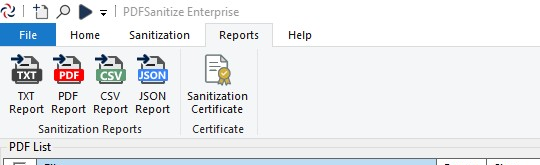
Each format represents information from the PDFSanitize processing session. The information available for a particular document depends on whether it has been analyzed, sanitized, verified, or only added to the document list.
TXT reports
TXT reports provide a plain-text record that can be opened with ordinary text editors such as Windows Notepad. They are available in every PDFSanitize edition and are useful when you want a readable record without requiring a specialized viewer.
Depending on the document’s processing state, a TXT report can include file information, analysis findings, sanitization settings, output paths, timestamps, SHA-256 fingerprints, warnings, and verification results.
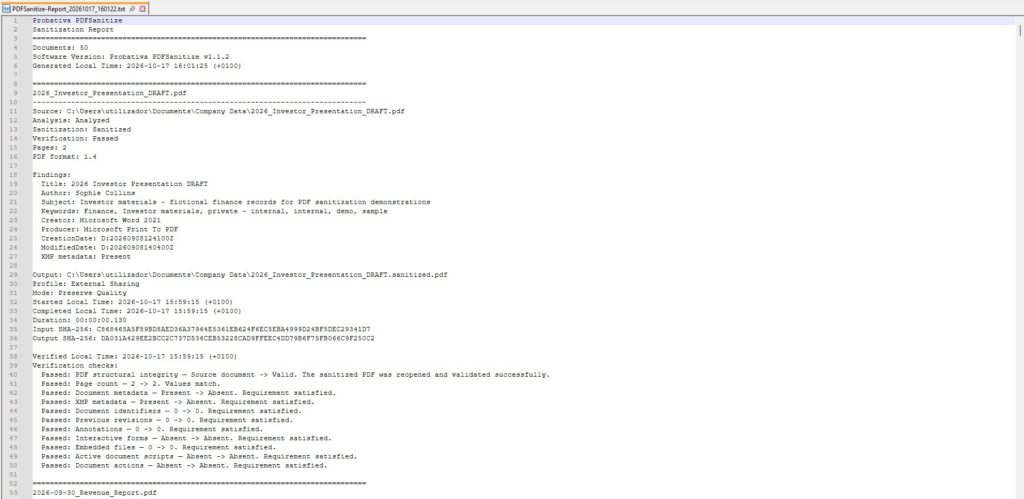
TXT is suitable for occasional personal use as well as simple organizational recordkeeping. Because it is ordinary text, it can also be searched or copied into other systems when necessary.
PDF reports
Pro and Enterprise can create formatted PDF reports intended for reading, printing, or storing alongside sanitized documents.
A PDF report presents the available processing information in a more structured visual format than a plain-text export. It can be useful when preparing records for colleagues, customers, supervisors, or an internal document repository.
The PDF report is separate from the sanitized document. It describes the operation and its results rather than replacing the sanitized output itself.
CSV reports
CSV is useful when you want to work with processing information in spreadsheet software or import it into another system.
For example, an organization that sanitizes several hundred documents may want to review filenames, statuses, fingerprints, and other available results in a table. A CSV export can be opened or imported into applications such as Microsoft Excel.
The information is arranged for tabular processing rather than for the detailed visual presentation offered by a PDF report. Depending on your requirements, CSV may be more convenient for sorting, filtering, and comparing document records.
JSON reports
JSON provides structured information that can be read by compatible applications, scripts, and document-management workflows.
It is particularly useful when processing records need to be imported into an internal system or associated with existing organizational data. The JSON report contains structured report information rather than requiring another application to extract values from a formatted PDF.
JSON reporting does not mean PDFSanitize provides an unattended processing service or external automation interface. It provides an export format that other applications can read after the report has been generated.
Certificate of Sanitization
Enterprise includes the Certificate of Sanitization, which produces a PDF record for selected documents that have completed sanitization and verification.
Unlike an ordinary report, certificate generation requires every selected document to have both results available. The certificate includes details about the processing session, files, fingerprints, environment, and verification outcomes.
A certificate can report success, success with warnings, or an error depending on the selected documents’ verification results. It should therefore be read as a record of the actual outcomes rather than as an automatic indication that every selected document passed.
Selecting documents for reports
Reports use the PDFs currently checked in the document list. Before exporting, confirm that the selection contains the documents you want included and excludes unrelated files.
Ordinary reports can describe documents in different processing states, including files that have not completed sanitization or verification. The existence of a report does not, by itself, indicate that every document it mentions was successfully sanitized.
For completed document-sharing workflows, review the individual results and retain the report together with the correct sanitized outputs.