
Strict Privacy is available in PDFSanitize Pro and Enterprise. It extends the External Sharing profile by removing additional navigation features and selected forms of hidden text while preserving normal PDF page content wherever possible.
The profile uses Preserve Quality mode by default. This makes it suitable for documents that need more extensive sanitization but should retain ordinary text and vector graphics on pages that do not require reconstruction.
What Strict Privacy removes
Strict Privacy includes the metadata, identifiers, previous revisions, comments, annotations, form structures, attachments, JavaScript, and document-action removals provided by External Sharing.
It additionally selects the removal of hyperlink annotations and supported external navigation actions, document bookmarks, and detected hidden or completely off-page text.
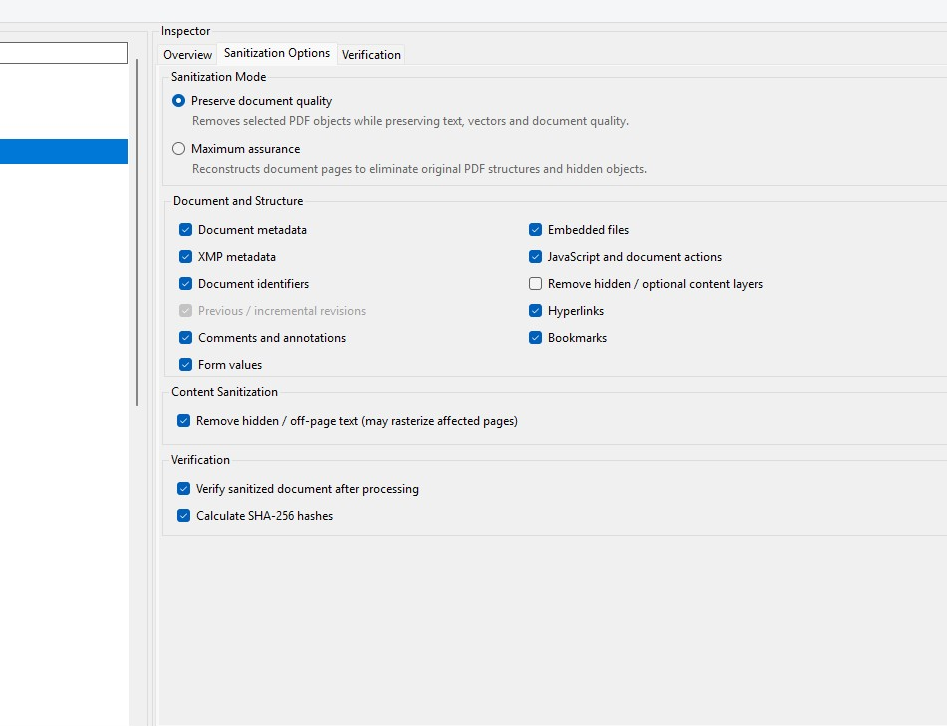
These additional settings can be useful when preparing internal reports for external distribution. For example, a document may contain links to internal company resources or text objects that exist outside the visible page area.
By selecting Strict Privacy, you can address those categories without automatically reconstructing every page of the document.
Hyperlinks and bookmarks
Removing hyperlinks affects the PDF’s link annotations and supported external navigation actions. It does not erase visible website addresses or other text printed on the page.
Some PDF viewers automatically recognize ordinary URL text and make it clickable, even when the PDF itself does not contain a link annotation. If an address must not be visible to the recipient, it needs to be removed or properly redacted from the page content.
Bookmark removal eliminates the document’s outline navigation. The visible headings and section titles printed on the pages remain part of the document unless separately changed.
Hidden-text removal and page reconstruction
Strict Privacy selects removal of text detected through invisible text-rendering modes or positioned completely outside the page boundary.
When PDFSanitize identifies this content, it can reconstruct the affected pages from their rendered appearance. This removes the original text objects from those pages while preserving their visible presentation.
Pages that do not require reconstruction can retain normal PDF text and vector graphics. As a result, a document processed with Strict Privacy may contain some image-based pages alongside other pages that remain searchable and selectable.
Before sanitization, PDFSanitize displays a warning when selective reconstruction is required and identifies how many pages will be affected. Review that information before continuing, particularly if text selection or accessibility is important.
Optional-content layers
Strict Privacy does not automatically remove optional-content layers in Preserve Quality mode. Some PDFs use these layers to display or hide alternative information, especially in drawings, maps, or complex technical documents.
Removing arbitrary optional-content structures while retaining the original page representation is not always safe. If you enable the layer-removal option in a custom configuration and the document contains optional content, PDFSanitize can block that combination in Preserve Quality mode.
When structural removal of optional-content layers is required, the predefined Maximum Assurance profile is the more appropriate choice because it reconstructs every page.
Using Strict Privacy
Begin by analyzing the PDF and reviewing the Overview, particularly findings related to hyperlinks, bookmarks, hidden text, and optional-content layers. Select Strict Privacy, confirm the active settings, and start sanitization.
Read any warnings about page reconstruction or advanced document structures before deciding to continue. Once processing finishes, inspect the verification results and open the sanitized PDF.
If certain pages were reconstructed, check their legibility and whether losing selectable text on those pages is acceptable. The remaining pages can retain their ordinary PDF content when no other selected operation requires reconstruction.
Strict Privacy provides more extensive removal than External Sharing, but it does not remove visible sensitive information or guarantee detection of every possible hidden-content technique. Documents containing confidential information should still be reviewed before distribution.