
Metadata Only is the least extensive predefined sanitization profile in PDFSanitize. It removes descriptive information and previous revisions from a PDF while retaining other document features that may still be needed by its recipients.
The profile is available in Standard, Pro, and Enterprise and uses Preserve Quality mode. It is a useful choice when you specifically want to clean up document metadata without removing interactive functionality or other embedded content.
Information removed
Metadata Only removes the PDF document information metadata, including properties such as Title, Author, Subject, Keywords, Creator, Producer, and related dates when they are present. These values may reveal who created the document, when it was edited, or which application produced the PDF.
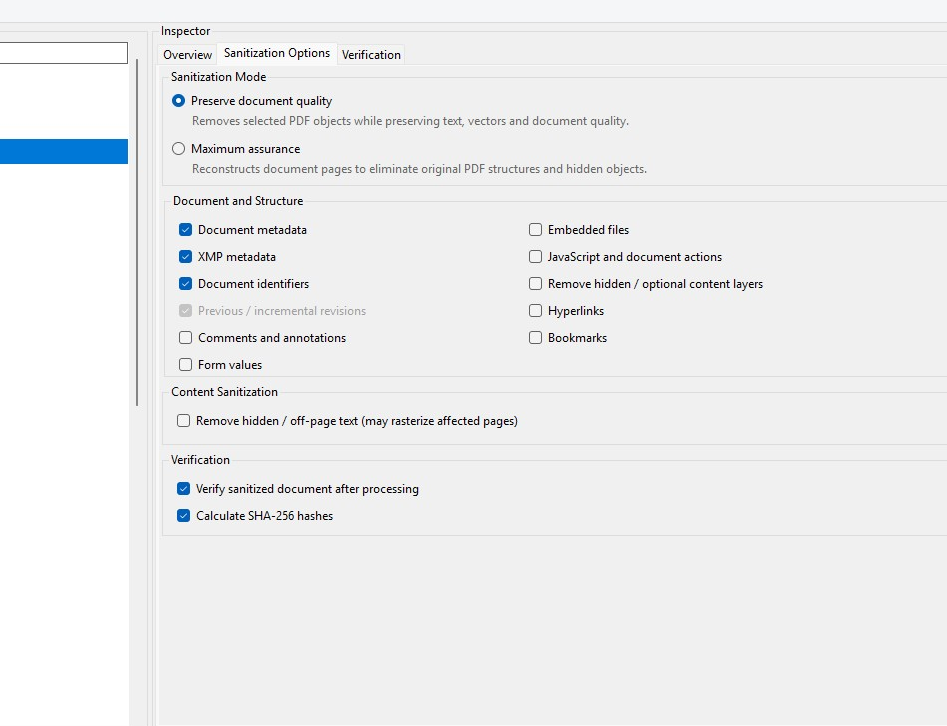
The profile also removes XMP metadata, which can contain additional descriptive information stored separately from the ordinary PDF document properties. Document identifiers are removed as well, reducing the information available for associating the sanitized document with its original PDF identity.
Previous or incremental revisions are always removed. Some PDF applications save changes by appending information rather than replacing all earlier content, so a PDF can contain historical structures that are not part of the current visible document.
For example, a report exported from a word processor may contain the original author’s name and creation date even though the final document is intended to be distributed without that information. Metadata Only addresses these document properties while retaining other normal PDF features.
Information retained
Metadata Only does not select the removal of comments, annotations, interactive forms, form values, embedded files, JavaScript, document actions, hyperlinks, bookmarks, optional-content layers, or hidden and off-page text.
The document’s visible text, images, and vector graphics are intended to remain available, together with the interactive features that the profile leaves in place.
This can be useful if you are preparing a PDF form that recipients still need to complete or a document containing bookmarks that should remain functional. However, the same retained features may contain information that you would prefer to remove before sending the document outside your organization.
Using Metadata Only
Add and analyze the PDF before selecting Metadata Only. Review the Overview to see whether the document contains attachments, annotations, forms, or other features that the profile will retain.
Select Metadata Only from the sanitization profiles and check the settings in Sanitization Options. Click Sanitize to create the new document, then examine the Verification tab and open the resulting PDF for review.
Automatic verification and SHA-256 fingerprint calculation are enabled by default. The verification checks the requirements selected by Metadata Only, including metadata and previous revisions, rather than expecting unrelated features to have been removed.
A successful result therefore does not mean the PDF contains no attachments, scripts, annotations, or hidden text. It means that the applicable verification checks for the selected settings were satisfied.
When another profile is more appropriate
If the document contains comments, form data, embedded files, or active document features that recipients should not receive, External Sharing provides a broader predefined cleanup.
For documents containing unwanted hyperlinks, bookmarks, or detected hidden text, Strict Privacy provides further removal options in Pro and Enterprise. Maximum Assurance is available when reducing the original page structures is more important than preserving selectable text and other PDF functionality.
Metadata Only is most useful when you already know which information needs to be removed and have determined that the remaining document features are appropriate for the intended recipients.